Passport Photo Maker & Editor3.0.2
Publisher Description


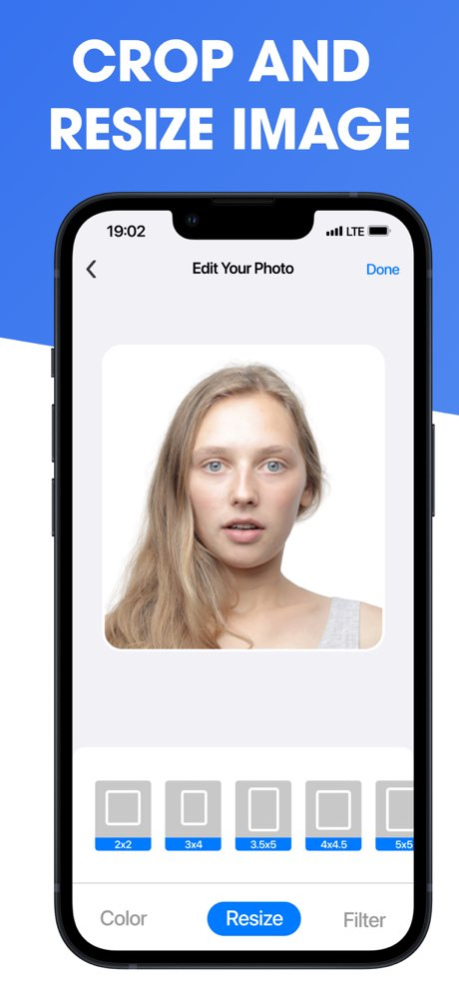

Create passport photos, visa photos, ID photos, and 2x2 photos from your iPhone in minutes. Passport Photo Maker & Editor helps you take or import a picture, remove the background, crop to the right shape, resize for common document photo formats, and save, share, or print your result at home.
Need a US passport photo, visa photo, green card photo, DV Lottery photo, passport picture, or ID card photo? Start with a camera photo, gallery image, or iCloud file. The app guides you through a simple passport photo editor workflow so you can make a clean, printable document photo without a photo booth.
Why use Passport Photo Maker & Editor?
- Passport photo maker for common document photo sizes, including 2x2 photo layouts
- Visa photo and ID photo maker for travel, forms, school, work, and profile documents
- Automatic background removal to create a clean passport-style photo
- Background color options, including white, light gray, and custom colors
- Crop, resize, zoom, and position your photo with simple editing controls
- Photo filters and adjustments for a clearer final image
- Download to Photos, share as an image, or print passport photos at home
- Print multiple copies on one page to save time and paper
- Works with photos from camera, iPhone gallery, or iCloud
A better way to make document photos
Photo booths can be expensive and inconvenient. Manual editing can be slow. Passport Photo Maker & Editor gives you a focused passport photo app for creating printable ID photos, visa pictures, passport size photos, and application photos whenever you need them.
Use it for:
- Passport photo and passport picture editing
- Visa photo, eVisa photo, and travel document photos
- ID photo maker and ID card photo needs
- Green card photo and DV Lottery photo preparation
- 2x2 photo creation for common document formats
- Print-at-home passport photos and ID photos
How it works:
1. Take a new photo or import one from your gallery or iCloud.
2. Remove the background and choose a clean background color.
3. Resize, crop, zoom, and position the image.
4. Save, share, or print your passport photo at home.
Passport Photo Maker & Editor is built for people who want a fast, simple, practical way to create passport photos, visa photos, ID photos, and printable document photos from their phone.
Privacy Policy: https://www.appnursery.com/privacy/
Terms: https://www.apple.com/legal/internet-services/itunes/dev/stdeula/
Version History Minor bug fixes 3.0.2 Jun 17 We've significantly improved the US Passport Photo Maker with Apple's stunning Liquid Glass design — it's our biggest update yet.
This release includes critical stability fixes that resolve crashes during photo capture and background removal, so your passport photo, visa photo, and ID photo editing experience is now smoother than ever.
What's improved:
Redesigned interface with Liquid Glass for a beautiful, modern passport photo editor experience
Fixed crashes affecting custom cropping
Faster background color adjustment for US passport, UK passport, and Schengen visa photos
Print multiple photos per page so you never run out
Create compliant passport photos at home — no photo booth needed. Update now and enjoy the best passport photo maker experience on iPhone, iPad, and MacOS. 3.0.1 Apr 26 We've significantly improved the US Passport Photo Maker with Apple's stunning Liquid Glass design — it's our biggest update yet.
This release includes critical stability fixes that resolve crashes during photo capture and background removal, so your passport photo, visa photo, and ID photo editing experience is now smoother than ever.
What's improved:
Redesigned interface with Liquid Glass for a beautiful, modern passport photo editor experience
Fixed crashes affecting custom cropping
Faster background color adjustment for US passport, UK passport, and Schengen visa photos
Print multiple photos per page so you never run out
Create compliant passport photos at home — no photo booth needed. Update now and enjoy the best passport photo maker experience on iPhone, iPad, and MacOS. 3.0.0 Mar 27 Improved free experience, fixed bug causing premium users to see ads and "upgrade" button 2.5 06/26/2025 minor bug fixes 2.4 05/19/2025 minor bug fixes 2.3 12/21/2024 Minor bug fixes 2.2 11/08/2024 Fixed ad-supported plan 2.1 10/21/2024 Added free ad-supported plan 2.0 10/16/2024 Minor bug fixes 1.9 10/07/2024 Fixed crash, updated support email 1.8 10/04/2024 Minor bug fixes 1.7 09/25/2024 What's New?
- We localized our app to new languages!
- Overall App Performance Improved 1.6 06/30/2024 What's New?
- We localized our app to new languages!
- Overall App Performance Improved 1.5 06/14/2024 Bug Fixes & Performance Improvements 1.4 01/05/2024 Minor bug fixes and improvements 1.3 11/21/2023 Minor bug fixes and improvements 1.2 10/01/2023 Bug fixed 1.1 07/19/2023 1.0 07/04/2023
About Passport Photo Maker & Editor
The company that develops Passport Photo Maker & Editor is App Nursery Pty Ltd. The latest version released by its developer is 3.0.2.
To install Passport Photo Maker & Editor on your iOS device, just click the green Continue To App button above to start the installation process. The app is listed on our website since 2026-10-07 and was downloaded 2 times. We have already checked if the download link is safe, however for your own protection we recommend that you scan the downloaded app with your antivirus. Your antivirus may detect the Passport Photo Maker & Editor as malware if the download link is broken.
How to install Passport Photo Maker & Editor on your iOS device:
- Click on the Continue To App button on our website. This will redirect you to the App Store.
- Once the Passport Photo Maker & Editor is shown in the iTunes listing of your iOS device, you can start its download and installation. Tap on the GET button to the right of the app to start downloading it.
- If you are not logged-in the iOS appstore app, you'll be prompted for your your Apple ID and/or password.
- After Passport Photo Maker & Editor is downloaded, you'll see an INSTALL button to the right. Tap on it to start the actual installation of the iOS app.
- Once installation is finished you can tap on the OPEN button to start it. Its icon will also be added to your device home screen.
Program Details
System requirements
Download information
Pricing
Version History
version 3.0.2
posted on 2026-10-07
Version History Minor bug fixes 3.0.2 Jun 17 We've significantly improved the US Passport Photo Maker with Apple's stunning Liquid Glass design — it's our biggest update yet.
This release includes critical stability fixes that resolve crashes during photo capture and background removal, so your passport photo, visa photo, and ID photo editing experience is now smoother than ever.
What's improved:
Redesigned interface with Liquid Glass for a beautiful, modern passport photo editor experience
Fixed crashes affecting custom cropping
Faster background color adjustment for US passport, UK passport, and Schengen visa photos
Print multiple photos per page so you never run out
Create compliant passport photos at home — no photo booth needed. Update now and enjoy the best passport photo maker experience on iPhone, iPad, and MacOS. 3.0.1 Apr 26 We've significantly improved the US Passport Photo Maker with Apple's stunning Liquid Glass design — it's our biggest update yet.
This release includes critical stability fixes that resolve crashes during photo capture and background removal, so your passport photo, visa photo, and ID photo editing experience is now smoother than ever.
What's improved:
Redesigned interface with Liquid Glass for a beautiful, modern passport photo editor experience
Fixed crashes affecting custom cropping
Faster background color adjustment for US passport, UK passport, and Schengen visa photos
Print multiple photos per page so you never run out
Create compliant passport photos at home — no photo booth needed. Update now and enjoy the best passport photo maker experience on iPhone, iPad, and MacOS. 3.0.0 Mar 27 Improved free experience, fixed bug causing premium users to see ads and "upgrade" button 2.5 06/26/2025 minor bug fixes 2.4 05/19/2025 minor bug fixes 2.3 12/21/2024 Minor bug fixes 2.2 11/08/2024 Fixed ad-supported plan 2.1 10/21/2024 Added free ad-supported plan 2.0 10/16/2024 Minor bug fixes 1.9 10/07/2024 Fixed crash, updated support email 1.8 10/04/2024 Minor bug fixes 1.7 09/25/2024 What's New?
- We localized our app to new languages!
- Overall App Performance Improved 1.6 06/30/2024 What's New?
- We localized our app to new languages!
- Overall App Performance Improved 1.5 06/14/2024 Bug Fixes & Performance Improvements 1.4 01/05/2024 Minor bug fixes and improvements 1.3 11/21/2023 Minor bug fixes and improvements 1.2 10/01/2023 Bug fixed 1.1 07/19/2023 1.0 07/04/2023
version 3.0.1
posted on 2026-06-15
Version History We've significantly improved the US Passport Photo Maker with Apple's stunning Liquid Glass design — it's our biggest update yet.
This release includes critical stability fixes that resolve crashes during photo capture and background removal, so your passport photo, visa photo, and ID photo editing experience is now smoother than ever.
What's improved:
Redesigned interface with Liquid Glass for a beautiful, modern passport photo editor experience
Fixed crashes affecting custom cropping
Faster background color adjustment for US passport, UK passport, and Schengen visa photos
Print multiple photos per page so you never run out
Create compliant passport photos at home — no photo booth needed. Update now and enjoy the best passport photo maker experience on iPhone, iPad, and MacOS. 3.0.1 Apr 26 We've significantly improved the US Passport Photo Maker with Apple's stunning Liquid Glass design — it's our biggest update yet.
This release includes critical stability fixes that resolve crashes during photo capture and background removal, so your passport photo, visa photo, and ID photo editing experience is now smoother than ever.
What's improved:
Redesigned interface with Liquid Glass for a beautiful, modern passport photo editor experience
Fixed crashes affecting custom cropping
Faster background color adjustment for US passport, UK passport, and Schengen visa photos
Print multiple photos per page so you never run out
Create compliant passport photos at home — no photo booth needed. Update now and enjoy the best passport photo maker experience on iPhone, iPad, and MacOS. 3.0.0 Mar 27 Improved free experience, fixed bug causing premium users to see ads and "upgrade" button 2.5 06/26/2025 minor bug fixes 2.4 05/19/2025 minor bug fixes 2.3 12/21/2024 Minor bug fixes 2.2 11/08/2024 Fixed ad-supported plan 2.1 10/21/2024 Added free ad-supported plan 2.0 10/16/2024 Minor bug fixes 1.9 10/07/2024 Fixed crash, updated support email 1.8 10/04/2024 Minor bug fixes 1.7 09/25/2024 What's New?
- We localized our app to new languages!
- Overall App Performance Improved 1.6 06/30/2024 What's New?
- We localized our app to new languages!
- Overall App Performance Improved 1.5 06/14/2024 Bug Fixes & Performance Improvements 1.4 01/05/2024 Minor bug fixes and improvements 1.3 11/21/2023 Minor bug fixes and improvements 1.2 10/01/2023 Bug fixed 1.1 07/19/2023 1.0 07/04/2023
version 2.5
posted on 2025-06-26
Improved free experience, fixed bug causing premium users to see ads and "upgrade" button
version 2.5
posted on 2025-06-26
Jun 26, 2025
Version 2.5
Improved free experience, fixed bug causing premium users to see ads and "upgrade" button
version 2.4
posted on 2025-05-19
May 19, 2025
Version 2.4
minor bug fixes
version 2.3
posted on 2024-12-21
Dec 21, 2024
Version 2.3
minor bug fixes
version 2.2
posted on 2024-11-08
Nov 8, 2024
Version 2.2
Minor bug fixes
version 2.0
posted on 2024-10-16
Oct 16, 2024
Version 2.0
Added free ad-supported plan
version 1.7
posted on 2024-09-25
Sep 25, 2024
Version 1.7
Minor bug fixes
version 1.6
posted on 2024-06-30
Jun 30, 2024
Version 1.6
What's New?
- We localized our app to new languages!
- Overall App Performance Improved
